
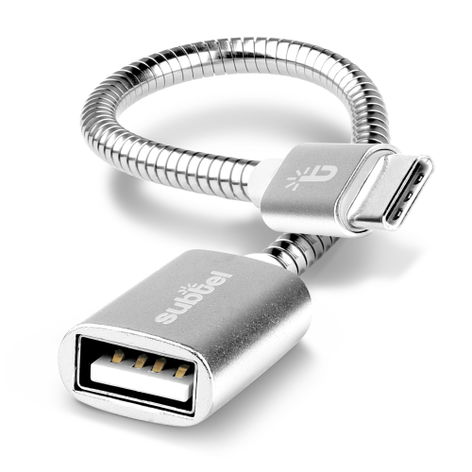
OTG Adapter Cable USB-C (Type-C) to USB A, 2.0 15cm Silver from subtel – Samsung Galaxy Tab S8 X700N, A7 (LTE) SM-T505
In stock
Delivery: 2-3 business daysShipping: 2.95 €


Secure payment
Your payment is sent over an SSL-encrypted connection and handled by our payment providers. We do not store your card details.
Your data is protected
We use your data to process your order and do not sell it to third parties. You can find the details in our privacy policy.


What our customers say
-
Verified buyer Germany
Everything great! Very good internet portal, good selection of products, impeccable quality, fast delivery! Overall everything ok
-
Reinhard Germany
Thank you, fast delivery, good quality, perfect function. Great price and performance. I can recommend it to others.
Fits your
We have not listed this product as compatible with the
That does not necessarily mean it will not fit — our compatibility list is not exhaustive.
Does this product fit your device?
Description
OTG adapter cable for your device – connect USB accessories without a computer, from subtel
Plug USB flash drives, card readers, keyboards, mice or gamepads straight into the listed models with this subtel OTG adapter cable (USB-C (Type-C) to USB A).
Compatible models (selection): Samsung Galaxy Tab S8 X700N, A7 (LTE) SM-T505
What makes the subtel OTG cable the right choice?
• File transfer – Copy photos and files to and from USB storage without a PC
• Input devices – Connect a keyboard, mouse or gamepad to the device
• Ready to use – The device must support USB On-The-Go (OTG); check the operating system, accessory and any required app or setup
• Details – 2.0, 15cm, Silver
Product specifications:
Brand: subtel
Connector 1: USB-C (Type-C)
Connector 2: USB A
Standard: 2.0
Length: 15cm
Colour: Silver
Before you buy: your device must support USB OTG; compare the model with the compatibility list.
Compatibility
Compatible models: Samsung Galaxy Tab S8 X700N, Samsung Galaxy Tab A7 (LTE) SM-T505, Samsung Galaxy Tab A7 (Wi-Fi) SM-T500, Samsung Galaxy Tab A8 SM-X200, Samsung Galaxy Tab A8 SM-X205, Samsung Galaxy Tab S6 LTE SM-T865, Samsung Galaxy Tab S6 Lite (2022) SM-P613, Samsung Galaxy Tab S6 Lite (2022) SM-P619, Samsung Galaxy Tab S6 Lite (LTE) SM-P615, Samsung Galaxy Tab S6 Lite (Wi-Fi) SM-P610, Samsung Galaxy Tab S6 Wi-Fi SM-T860, Samsung Galaxy Tab S7 FE SM-T730, Samsung Galaxy Tab S7 FE SM-T735, Samsung Galaxy Tab S7 FE SM-T736, Samsung Galaxy Tab S7 LTE SM-T875, Samsung Galaxy Tab S7 Plus Wi-Fi SM-T970, Samsung Galaxy Tab S7 Wi-Fi SM-T870, Samsung Galaxy Tab S8 Plus X806B, Samsung Galaxy Tab S8 ultra X906B, Samsung Galaxy Tab S9 Plus SM-X810, Samsung Galaxy Tab S9 SM-X710, Samsung Galaxy Tab S9 Ultra SM-X910, Samsung SM-T307 Galaxy Tab A 8.4 (2020), Samsung SM-T390 Galaxy Tab Active 2, Samsung SM-T395 Galaxy Tab Active 2, Samsung SM-T510 Galaxy Tab A 10.1 Wi-Fi, Samsung SM-T515 Galaxy Tab A 10.1 LTE, Samsung SM-T540 Galaxy Tab Active Pro Wi-Fi, Samsung SM-T545 Galaxy Tab Active Pro LTE, Samsung SM-T590 Galaxy Tab A 10.5 Wi-Fi, Samsung SM-T590N Galaxy Tab A 10.5, Samsung SM-T595 Galaxy Tab A 10.5 LTE, Samsung SM-T720 Galaxy Tab S5e Wi-Fi, Samsung SM-T725 Galaxy Tab S5e LTE, Samsung SM-T820 Galaxy Tab S3 (WiFi), Samsung SM-T825 Galaxy Tab S3 (LTE), Samsung SM-T830 Galaxy Tab S4, Samsung SM-W620 Galaxy Book 10.6 WiFi, Samsung SM-W627 Galaxy Book 10.6 LTE, Samsung SM-W700 TabPro S, Samsung SM-W703 TabPro S, Samsung SM-W708 TabPro S, Samsung SM-W720 Galaxy Book 12.0 WiFi, Samsung SM-W728 Galaxy Book 12.0 LTE
See the Compatibility tab for the complete checked list.
OTG support alone does not establish every accessory function. Check operating-system or app support, storage formats and the accessory’s power requirements. Some USB accessories may need their own power supply.