
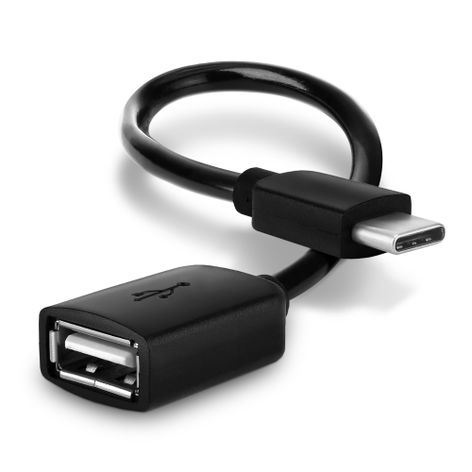
OTG Adapter Cable USB-C (Type-C) to USB A, 2.0 15cm Black from CELLONIC – iPhone 16 Pro Max; Apple iPhone 16 Pro Max
In stock
Delivery: 2-3 business daysShipping: €2.95


Secure payment
Your payment is sent over an SSL-encrypted connection and handled by our payment providers. We do not store your card details.
Your data is protected
We use your data to process your order and do not sell it to third parties. You can find the details in our privacy policy.




What our customers say
- jean-claude France
Very satisfied. Material as ordered and delivered quickly.
- Brigitte Germany
The USB cable works perfectly, I am very satisfied.
Verified purchase
Fits your
We have not listed this product as compatible with the
That does not necessarily mean it will not fit — our compatibility list is not exhaustive.
Does this product fit your device?
Description
OTG adapter cable for your device – connect USB accessories without a computer, from CELLONIC
Plug USB flash drives, card readers, keyboards, mice or gamepads straight into the listed models with this CELLONIC OTG adapter cable (USB-C (Type-C) to USB A).
Compatible models (selection): iPhone 16 Pro Max; Apple iPhone 16 Pro Max
What makes the CELLONIC OTG cable the right choice?
• File transfer – Copy photos and files to and from USB storage without a PC
• Input devices – Connect a keyboard, mouse or gamepad to the device
• Ready to use – The device must support USB On-The-Go (OTG); check the operating system, accessory and any required app or setup
• Details – 2.0, 15cm, Black
Product specifications:
Brand: CELLONIC
Connector 1: USB-C (Type-C)
Connector 2: USB A
Standard: 2.0
Length: 15cm
Colour: Black
Before you buy: your device must support USB OTG; compare the model with the compatibility list.
Compatibility
Compatible models: iPhone 16 Pro Max, Apple iPhone 16 Pro Max, Samsung Galaxy S25, Samsung Galaxy S25 Ultra, Samsung Galaxy S26 Ultra, Samsung Galaxy S26, Samsung Galaxy S24, Samsung Galaxy A56, Samsung Galaxy S24 Ultra, Samsung Galaxy S23, Samsung Galaxy S23 Ultra, Samsung Galaxy S22, Motorola RAZR 60 Ultra, Samsung Galaxy S25 Plus, Samsung Galaxy S22 Ultra, Xiaomi Poco F7 Ultra, Samsung Galaxy A15, Vivo X200 Pro, Samsung Galaxy A14, Oppo Find X8 Pro, Samsung Galaxy Z Flip, Samsung Galaxy Z Fold 6, Samsung Galaxy A25, Samsung Galaxy A54 5G, Samsung Galaxy S24 Plus, Samsung Galaxy S26 Plus, Samsung Galaxy A35 5G, ASUS ROG Phone 9 Pro, Motorola Razr 60, Samsung Galaxy Z Fold, Samsung Galaxy Z Flip 5, Sony Xperia 1 VI, Samsung Galaxy A34 5G, Samsung Galaxy Note 20 Ultra, Samsung Galaxy A52s 5G, Samsung Galaxy S21 FE, Samsung Galaxy S23 Plus, Samsung Galaxy S24+, Samsung Galaxy Z Fold 5, Samsung Galaxy Z Flip4, Samsung Galaxy Note 10, Samsung Galaxy Note 20, Samsung Galaxy A41, Samsung Galaxy S26+, Samsung Galaxy S22 Plus, Samsung Galaxy Note 9, Samsung Galaxy Z Fold4, ASUS ROG Phone 9, Samsung Galaxy Note 8, Samsung Galaxy A04s, Samsung Galaxy Note 10 Plus, Samsung Galaxy Z Flip3, Samsung Galaxy A24, Samsung Galaxy A21, Samsung Galaxy xCover 6 Pro, ASUS Zenfone 12 Ultra, Samsung Galaxy M13, Samsung Galaxy Z Fold3, Ulefone Armor 28 Ultra Thermal, Samsung Galaxy A73 5G, Samsung Galaxy A75, Samsung Galaxy A77, Samsung Galaxy A76, Samsung Galaxy Z Flip 5G, Samsung Galaxy M53 5G, Samsung Galaxy A43, Samsung Galaxy A79, Samsung Galaxy A78, Samsung Galaxy A02s (SM-A025), Samsung Galaxy A03s (SM-A037), Samsung Galaxy A11 (SM-A115), Samsung Galaxy A12 (SM-A125), Samsung Galaxy A13 (SM-A135), Samsung Galaxy A20 (SM-A205), Samsung Galaxy A20e (SM-A202), Samsung Galaxy A21s (SM-A217), Samsung Galaxy A22 (SM-A225), Samsung Galaxy A22 5G (SM-A226), Samsung Galaxy A23 (SM-A235), Samsung Galaxy A3 (2017 - SM-A320F), Samsung Galaxy A30 (SM-A305), Samsung Galaxy A30s (SM-A307)
See the Compatibility tab for the complete checked list.
OTG support alone does not establish every accessory function. Check operating-system or app support, storage formats and the accessory’s power requirements. Some USB accessories may need their own power supply.